
Tech
[Cloudflare Pages] bun patch Didn't Apply in Production
I had patched a package in node_modules with bun patch, but on closer inspection, the patch was not applied in production. The actual cause was that the project was being installed with npm rather than Bun, so here is how I fixed it.
Note
This article was initially translated with GPT-5.6 and then reviewed and edited by the author.
Conclusion
To build with Bun, this command is not enough:
bun run buildUse this instead:
npm install -g bun && bun install && bun run build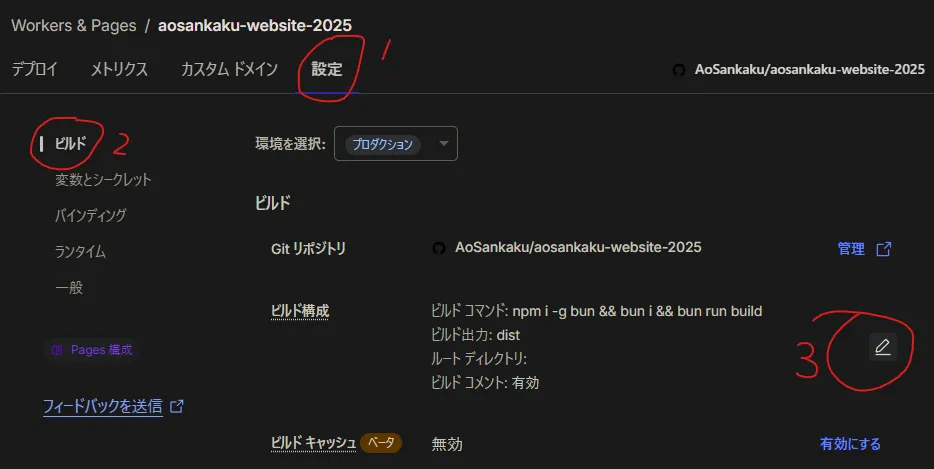
This is where you put it.
What I wanted to do
I recently learned that:
bun patchlets you edit packages inside node_modules. I think you can do the same thing with npm or Yarn.
Tip
To learn more about bun patch, you could read this article or something.
However, although the patch worked properly in local builds and the development environment, it did not work on Cloudflare Pages. That was strange.
So I checked the logs:
23:36:03.477 Cloning repository...23:36:06.576 From https://github.com/AoSankaku/aosankaku-website-202523:36:06.576 * branch f6c417a0565109496eba7f527d4fb56d27a20a50 -> FETCH_HEAD23:36:06.57623:36:06.862 HEAD is now at f6c417a Repatched @astro-community/astro-embed-youtube prefetch23:36:06.86223:36:06.93223:36:06.932 Using v2 root directory strategy23:36:06.952 Success: Finished cloning repository files23:36:08.787 Checking for configuration in a Wrangler configuration file (BETA)23:36:08.78723:36:09.887 No wrangler.toml file found. Continuing.23:36:09.951 Detected the following tools from environment: [email protected], [email protected]23:36:09.952 Installing project dependencies: npm install --progress=false23:36:43.266 npm warn deprecated [email protected]: Use @exodus/bytes instead for a more spec-conformant and faster implementation23:36:48.70823:36:48.709 added 580 packages, and audited 581 packages in 38s23:36:48.70923:36:48.709 196 packages are looking for funding23:36:48.709 run `npm fund` for details23:36:48.71023:36:48.710 found 0 vulnerabilities23:36:48.736 Executing user command: bun run build23:36:48.958 $ astro build23:36:51.468 14:36:51 [content] Syncing content…It very clearly says [email protected].
In other words, I had convinced myself that Bun was being used throughout the entire process when it actually was not. Scary.
After that, all I had to do was change the command as described at the beginning of the article.
Bonus
As an added benefit, the build—or, more precisely, the package download—became a little faster.
Thirty seconds is a pretty big difference.
Before switching to Bun:

After switching to Bun: